Film Slitting Edge Defects: Curl, Rough Edges, Dust, and Width Variation

When slit film shows curled edges, rough cuts, dust, or unstable width, inspect the edge immediately after cutting. This first observation helps separate a cutting problem from an issue that develops farther downstream.

If the defect is already visible at the knife, start with the blade, knife holder, contamination, cutting position, and film support. If the edge leaves the knife clean and changes later, follow the affected slit lane through the guiding, traction, and rewinding sections.

Before changing machine settings, compare the defective lane with the good lanes. Record where the defect begins, whether it stays at one knife position, and whether speed, tension, or lane width changes its appearance.

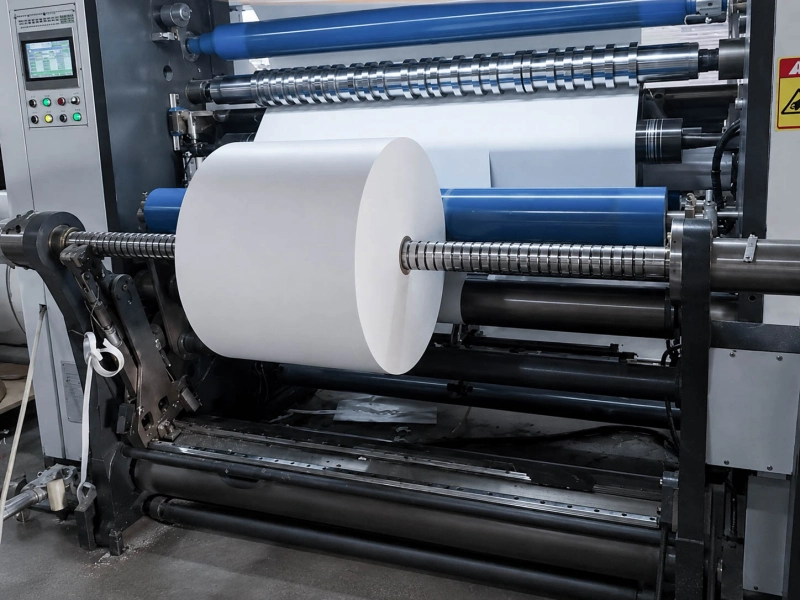
White web roll running through a slitting and rewinding machine

Match the Defect to the Area Where It Starts

Different edge defects point to different inspection areas. Check the edge near the knife first, then follow it downstream.

What You See What It May Indicate First Check
One edge remains rough at the same knife position Local blade, holder, contamination, or poor cutting contact Inspect that knife position
Several lanes become rough together General blade wear, material change, unstable support, or higher speed Compare the full knife section
Dust starts below one knife Local cutting problem Check blade condition and deposits
Dust appears across many lanes Wider knife, material, or setup issue Compare all lanes before adjustment
Curl appears immediately after cutting Cutting contact, film stress, or poor support Record curl direction at the knife
Edge is clean at the knife but curls later Lane tension, drag, traction, or winding contact Follow the lane downstream
Only narrow lanes become unstable Small differences in tension, drag, direction, or core position Compare narrow and wide lanes
Outer lanes differ from center lanes Side-to-side alignment, support, or tension difference Compare both machine sides
Width varies close to the knife Knife position, blade stability, web movement, or poor flatness Measure the free lane after cutting
Free-lane width is stable but the finished roll looks uneven Lane movement, core position, or winding entry Check the path into rewinding

Edge Curl

Record whether the edge curls upward, downward, toward the lane center, or outward. Also note whether it affects one edge or both edges.

Curl that appears immediately after cutting can come from uneven cutting contact, weak support at the knife, or stress released from the film. Coated, laminated, stretched, or unevenly stored film may retain internal stress that becomes visible only after slitting.

If the edge remains flat at the knife and curls later, compare the affected lane with its neighbors. Look for a different running path, higher drag, uneven pull, or extra pressure.

Rough, Frayed, or Ragged Edges

A poor slit edge may look fuzzy, torn, feathered, or jagged.

If the same edge remains rough at one knife position, inspect that local blade and holder first. If many lanes become rough together, look for a change affecting the full width, such as general blade wear, a new material roll, higher speed, or unstable film support.

On thicker or coated film, a raised edge may sometimes be called a slitting burr. The visible shape and location are more useful than the term itself.

Slitting Dust and Debris

Slitting debris may appear as fine powder, flakes, loose particles, or thin strings.

Record where it first appears. Dust found on a downstream surface may have been carried there from the knife. Clean the area and observe where the debris begins to return rather than judging the source by the largest final deposit.

Slit Width Variation

Measure the lane shortly after cutting, before it passes through several contact points. Compare this measurement with the finished roll.

If the width already varies near the knife, inspect the knife position, blade stability, film alignment, and flatness. If the free-lane width remains stable but the finished roll appears uneven, check lane movement and winding entry.

Check the Knife Area First

For rough edges, cutting dust, and width changes that are already visible after the knife, inspect the cutting area before changing general tension or rewinding settings.

Check:

  1. Blade sharpness and visible damage
  2. Adhesive, coating residue, or packed dust
  3. Knife-holder looseness or movement
  4. Blade installation and cutting position
  5. Film support at the cutting point
  6. Recent blade, material, cleaning, or setup changes

Compare the defective position with a good knife position. When machine conditions allow, exchange the suspected blade with a known good position. If the defect moves with the blade, the cutting tool or holder remains the strongest suspect.

Knife spacing, contact, and overlap affect edge quality, but the correct setting depends on the knife system, film structure, thickness, and machine design. A single setting should not be applied to every film.

Increasing web tension may hold the film more firmly for a short time, but it will not repair a damaged blade or stabilize a loose holder.

The guide, support, tension, traction, and rewind-contact positions used around this section are shown on Slitting and Rewinding Line Rollers.

Check the Web Immediately Before the Knife

The film should enter the knife section flat, steady, and correctly aligned.

Observe the short section immediately before cutting:

  • Does the film remain flat across the full width?
  • Does one side appear tighter?
  • Does the web flutter when speed increases?
  • Does it move sideways relative to the knives?
  • Is the final guide roller clean and turning freely?
  • Is the final roller parallel to the knife section?

If the complete web moves sideways before cutting, the problem is closer to guiding than to one local blade. Wider causes of lateral movement are covered in Web Tracking Problems.

The final Guide Roller deserves attention when the film enters the knife at an angle, one side remains tighter, or the film position changes during production.

If loose areas or light wrinkles are already visible before cutting, check the nearby path and Spreader Roller. This check is useful only when the film is already uneven before reaching the knife.

Follow Each Lane After Cutting

After the full web is divided, each slit lane reacts separately to tension, running resistance, traction, and winding contact.

Narrow lanes often show instability first. A small difference in drag or direction has a stronger effect on a narrow strip, so one narrow lane may curl or move while wider lanes still appear stable.

Lane Tension

Check whether several lanes change together after a speed or tension adjustment. Also compare the operator side, center, and drive side of the machine.

The Tension Control Rollers are worth checking when:

  • several lanes become unstable at the same time;
  • one machine side consistently runs tighter;
  • the problem changes with speed or roll diameter;
  • lane separation becomes less stable after the slit.

A tension adjustment may change how the defect looks without removing its original cause. Compare the actual edge before and after the adjustment.

Traction and Running Resistance

Check the Traction Rollers and nearby free-running rollers when:

  • the edge changes after a driven contact point;
  • one lane becomes unstable at higher speed;
  • cleaning temporarily improves the condition;
  • part of the contact surface is dirty, smooth, worn, or sticky;
  • one lane moves differently from the neighboring lanes.

Also check whether the nearby rollers turn smoothly. Uneven bearing resistance can add drag to one side without leaving a clear mark on the film.

A roller position becomes relevant when the edge is acceptable before contact and deformed after it. At that position, check surface cleanliness, wear, free rotation, side-to-side drag, parallel installation, and contact pressure.

Dust on a roller does not prove that the roller generated it. If the debris starts at the knife and later transfers to the roller, the cutting area remains the source.

Winding Entry

Confirm that:

  • each core is correctly positioned;
  • every lane reaches its core without a sharp sideways correction;
  • rewind contact is even across the lanes;
  • narrow lanes are not pulled differently;
  • an existing curled edge is not being pressed into a stronger shape.

If the free-lane width remains stable but the finished roll appears wider, narrower, or uneven, record the core position and lane movement.

Broader winding problems such as wrinkles, slipping, repeat marks, and uneven roll build are covered in Common Slitting and Rewinding Problems.

Send Drawings or Roller Details

Before contacting Wolorin, note the affected lane, where the edge first changes, and whether the problem changes with speed, tension, or cleaning. A few photos of the slit edge and the suspected contact position are usually enough to start.

If the evidence points to a guide, tension, traction, pressure, or rewind-contact roller, send the roller position, dimensions, surface photos, film type, line speed, and contact condition.

If you already have drawings, sizes, samples, or a clear specification, you can send them directly to Wolorin. We can proceed with custom manufacturing, quotation, or production confirmation based on your documents.

If the information is incomplete, start with the roller position, the film it contacts, and the issue you want to solve.