Offset Ink Roller Stripping and Ink Rejection

A dry band appears on one offset ink roller while the rest of the surface still carries ink. In other cases, the whole roller looks normal at startup, then a weak band develops later and the ink film begins to break. Cleaning may restore it for a while, only for the same area to go dry again.

Start with the pattern. Check whether the dry area stays at one roller position, spreads through several rollers, or follows changes already happening during production. Fountain solution, ink condition, contamination and temperature deserve attention while the problem moves with the process. If it repeatedly returns to the same part of one roller, the roller surface and finished specification deserve a closer look.

In offset pressroom use, roller stripping refers to the loss of stable ink acceptance on part of an ink roller surface. It is different from removing old ink during wash-up or the separate prepress use of the word “stripping.”

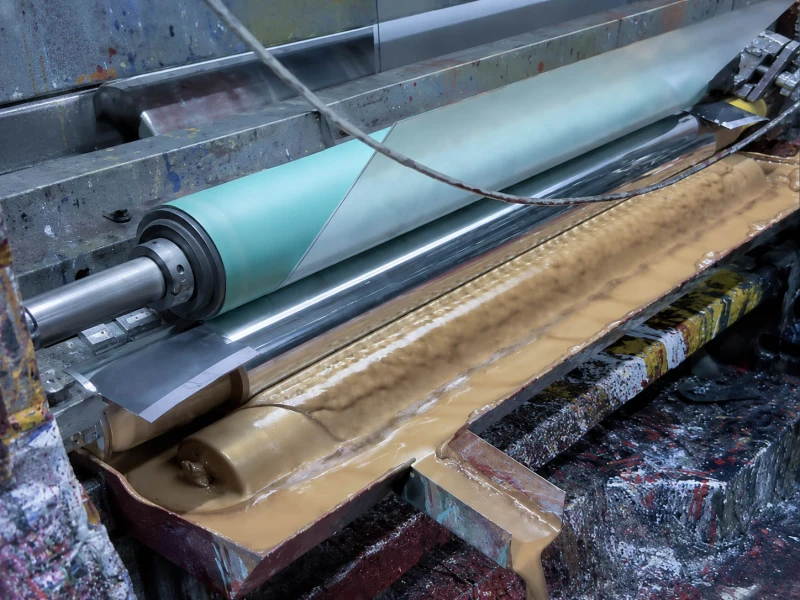
industrial transfer and coating roller process

Does the Dry Band Stay in One Place?

A fixed band is easier to trace than a general complaint that “the roller does not take ink.”

Record where the band sits across the roller face and how wide it is. If it repeatedly returns to roughly the same cross-machine position, note which roller it belongs to as well. A band that stays on one roller through normal color changes or job changes carries more weight than a weak area that moves around the ink train.

When several rollers begin carrying ink poorly at about the same time, look at what those rollers share. Excess fountain solution, a change in ink–water interaction, contamination, or another common operating condition belongs earlier in the check.

Intermittent transfer gives a different pattern. The roller may carry ink normally at startup and lose it after the press has been running for some time. If that timing repeats from run to run, write it down. “Starts after warm-up” is more useful than “sometimes strips.”

For a wider view of rubber-covered roller positions around printing lines, see Printing Industry Rollers.

What Changes Before the Ink Starts Pulling Away?

Normal production usually gives enough comparison points without creating a special test. A new ink, a color change, a longer run, a warmer ink train, normal cleaning, or an existing change in dampening condition can all provide useful evidence.

What you see Compare with Keep attention on
The same dry band stays on one roller. Band position, width, cleaning response and the local roller surface. Local contamination or a persistent change in that part of the cover.
Several rollers lose ink at about the same time. Fountain condition, ink condition and when the problem started. Ink–water interaction or a condition shared by the roller train.
The roller is normal at startup and strips later. Running time, available roller temperature and whether the timing repeats. Temperature-related ink behavior or something building during the run.
Cleaning restores the film, then the same area dries again. How long the recovery lasts and exactly where the band returns. Recurring contamination or a persistent local surface change.
The problem starts after an ink, color or job change. The previous stable job and what actually changed between the two runs. Ink, fountain solution, wash history or another changed process condition.

Actual changes to fountain solution, press settings or cleaning chemistry should follow the press manufacturer and consumable supplier requirements.

Does the Problem Move with the Dampening Condition?

Offset ink rollers work continuously around an ink–water balance. When too much fountain solution reaches the ink train, or when contamination changes the way a surface wets, the ink film can lose stability.

Calcium is a practical example. Calcium carbonate from paper can enter the dampening system. Calcium and gum contamination can make ink rollers more hydrophilic, allowing fountain solution to stay on the roller surface more readily and contributing to ink emulsification and roller stripping.

Other deposits, including soap, clay and paper-related debris, can also interfere with the condition of ink rollers and the dampening system. A roller can therefore look mechanically intact while its surface no longer behaves the way it did when clean and stable.

The useful field signal is whether the dry area moves or changes as the dampening condition changes during normal production. If several rollers react together, keep the investigation on the shared process condition before treating one roller as the cause.

Does Stripping Appear Only After Warm-Up?

The ink train generates heat through roller friction. Offset ink viscosity responds strongly to temperature, so a roller train that behaves normally when cold can behave differently later in the run.

A useful published scale is that a 1°F change can alter offset ink viscosity by about 3–4%. Changes in viscosity also affect tack, water pickup and other press behavior. This figure is useful as background, not as a press setting or acceptance limit.

If the same weak band begins after a similar running time on several jobs, record the time and any available roller-surface temperature. If the band is already present from startup and stays in exactly the same position, temperature becomes a weaker lead.

What Does Cleaning Change?

Cleaning is useful because it gives a before-and-after comparison. The most useful part comes after the roller has started carrying ink again.

If normal approved cleaning restores the whole ink film and the next dry area appears somewhere else, changes width, or only returns with a certain ink or job, the problem is still moving with production conditions.

A different history is more interesting for the roller. The surface looks clean, ink transfer returns, and after a short period the film opens again in almost exactly the same place. Record how long that recovery lasts. A few minutes, one production shift, and several days describe very different behavior.

Avoid turning this observation into repeated stronger cleaning. The suitable wash depends on the ink system, roller cover and press requirements, and stronger chemistry can also change rubber condition.

Is It Stripping or a Glazed Roller?

Glazing and stripping can occur on the same roller, but they leave different clues.

What to look at Roller stripping Glazing or deposits
Ink film Ink becomes weak, pulls away or leaves a dry band. Ink transfer may become poor, but the changed roller surface is usually easier to see.
Surface appearance The rejected area can still look fairly clean. The surface often looks polished, shiny, coated or visibly contaminated.
Best evidence Where the dry area appears and whether it keeps returning there. What has built up on the surface and how quickly that condition returns.

A glazed or contaminated surface can eventually contribute to poor ink acceptance. When the visible surface layer is the main symptom, that deposit deserves its own diagnosis. For stripping, keep following the dry-band pattern and its recovery behavior.

When Should You Check the Roller Itself?

The roller becomes a stronger lead when the evidence keeps returning to the same place: one roller, one section of the face, a similar dry-band width, and only temporary recovery after normal cleaning. A problem that begins shortly after replacement, grinding or re-covering gives another reason to compare the roller with its previous stable condition.

Look Across the Whole Roller Face First

A close photo of the dry area is useful, but start with the complete roller face. It is easier to spot a local difference when the affected area can be compared with the rubber on both sides.

Look for local polishing, unusual smoothness, tackiness, hardening, swelling, fine cracking, embedded contamination or uneven wear. The surface change does not have to look dramatic. A small difference that follows the dry band exactly can be more useful than a large damaged area somewhere else on the roller.

Rollers that have to pick up and release a controlled ink or liquid film depend heavily on consistent surface behavior. The broader relationship between surface condition, contact medium and transfer stability is also relevant to Transfer Rollers.

Compare Hardness and Diameter with a Stable Old Roller

If the previous roller ran well for a long period, keep its measurements and photos. They are often more useful than a nominal drawing alone.

Hardness affects how the cover deforms where two rollers contact and how the ink film splits between their surfaces. Finished outside diameter affects the roller’s installed contact geometry. A metal core can match the drawing while the finished roller still behaves differently because its cover hardness, diameter or ground surface has changed.

Detailed roller settings and nip measurements belong to the press manufacturer’s procedure. For a replacement project, the practical comparison is whether the new roller matches the known stable roller in the dimensions and cover properties that matter at that position.

Check the Rubber Direction After the Problem Is Tied to the Roller

Offset ink rollers repeatedly contact ink, fountain solution, wash chemistry and heat. The finished cover has to stay stable under that combination.

Printing-roller manufacturers use different compound families for conventional, UV and mixed-mode printing because the contact chemistry is different. This is why the rubber family name alone is a poor answer to a stripping problem.

Start with the ink system, wash chemistry, running temperature, hardness, roller position and the history of the old roller.

For selected ink and general industrial media-contact positions, NBR / Nitrile Rubber Rollers can be one material direction to review. Where the actual roller position sees more demanding heat or chemical exposure, FKM Rubber Rollers may also be relevant.

Neither material should be selected from the dry-band symptom alone. If the old roller worked well, its original material direction and finished condition are useful starting points. If it repeatedly hardened, swelled, became tacky or lost surface stability, the replacement deserves a closer compound review.

What Should You Record Before Replacing the Roller?

A short, consistent record is usually enough. There is no need to prepare a full press diagnosis for a roller supplier.

  • Dry-band position and approximate width.
  • The exact roller position and whether neighboring rollers show the same rejection.
  • Whether the problem is already present at startup or appears after a repeatable running time.
  • Ink type and whether the problem began after an ink, color or job change.
  • Available dampening records and roller-surface temperature around the time the problem appears.
  • What normal cleaning changes, how long the improvement lasts, and where the dry band returns.
  • Full-face photos and close photos of the old roller, especially the dry area and any visible surface change.
  • Current outside diameter, hardness, and any recent replacement, grinding or re-covering history.

For a roller project, these records are usually enough to decide whether a straightforward replacement can follow the previous stable specification or whether the cover material, hardness, finished diameter or surface condition needs closer confirmation.

Printing Industry Rollers — Rubber-covered roller positions and working conditions around printing-related lines.

Transfer Rollers — Surface and contact requirements for controlled pickup and transfer of ink and other process media.

NBR / Nitrile Rubber Rollers — A material direction for selected ink and general industrial media-contact roller positions.

FKM Rubber Rollers — A material direction to review where heat or more demanding chemical exposure affects the roller.

If you already have drawings, dimensions, a sample, or a clear roller specification, send them directly for custom manufacturing, quotation, or production confirmation.

If details are incomplete, start with old roller photos, basic dimensions, roller position, contact medium, and the current roller-related problem.