Why Does Film Slip or Lose Traction at High Speed?

Film may run well during setup and low-speed production, then start slipping as the line accelerates.

The web may fall behind the roller, tension may begin moving, one edge may become unstable, or the film may ride lightly over the roller instead of sitting firmly on it.

The speed change is the main clue. Something at the contact point, roller, or drive can no longer keep up with the faster web.

Start with the speed where the first change appears. Then check the web-to-roller contact, wrap angle, tension, roller surface, and actual roller speed.

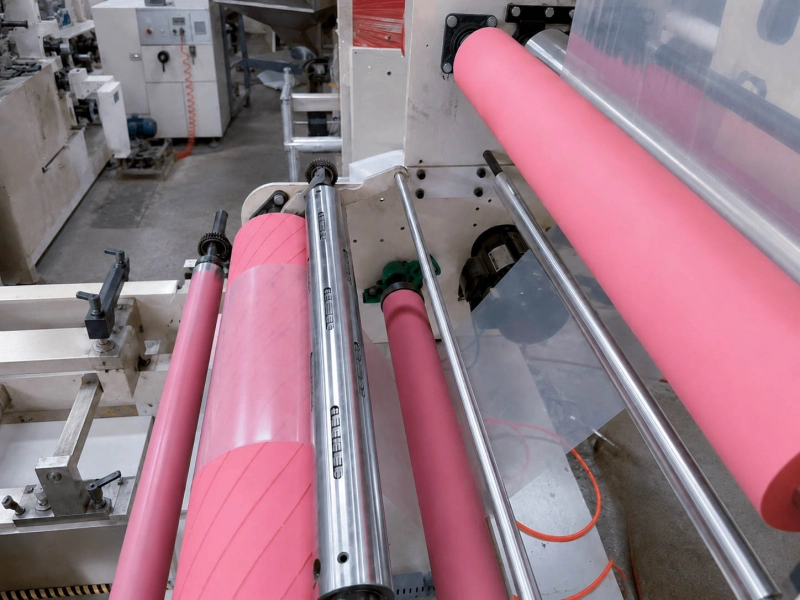
Pink rubber spreader rollers used in film handling equipment

Start with the Speed Where the Problem Begins

Keep the same film, web path, tension setting, and roller position. Raise the line speed in steps.

Record the highest stable speed and the point where the first change appears. Then slow the line down and see whether the problem disappears.

Watch for the first small sign:

  • The film starts falling behind the roller
  • The tension reading begins moving
  • One edge becomes less stable
  • A light rubbing sound appears
  • One idler turns more slowly than nearby rollers

Also note whether the problem appears immediately after acceleration or only after the line has been running for some time.

An immediate change usually points toward contact, trapped air, roller response, or speed matching. A delayed change may involve heat, contamination, coating transfer, or a bearing that becomes tighter as it warms up.

The Film May Be Riding on a Thin Layer of Air

Moving film carries air toward the roller.

At low speed, most of that air has time to escape. At higher speed, some of it can remain between the film and roller. This is commonly called air entrainment.

The film may still look close to the roller, but less of it is firmly touching the surface. The roller keeps turning while the film starts to lag.

This happens more easily when the film is smooth, the roller surface is smooth, the wrap angle is small, or web tension is low. Roller diameter can also affect how easily air leaves the contact.

Air is not a problem at every position. On a roller that does not need to pull the film, a small air layer can reduce rubbing and help protect a sensitive surface.

At a traction position, the same air layer can reduce grip.

For film lines where speed, contact, and surface protection need to be considered together, see Film Converting Rollers.

Check the Wrap Angle and Web Tension

A small wrap angle means less film is in contact with the roller.

Compare the current web path with the setup that worked before. Wrap may have changed because a guide roller was moved, the threading route was altered, or a roller was ground to a smaller diameter.

Tension also helps keep the film against the roller.

If tension is too low, the film lifts more easily. Raising the tension may improve grip, but too much tension can stretch thin film, pull in the edges, or create another problem farther down the line.

Record the tension before and after the suspect roller. If both readings are steady at low speed but begin moving after acceleration, the roller position is no longer transferring the web consistently.

A small wrap adjustment can be a useful test. If the line becomes more stable, check the web path and roller contact before making a permanent setting change.

For slipping that also happens at low speed, see Why Web Material Slips on Rubber Rollers.

Check the Actual Roller Speed

Do not assume the roller is running at the correct speed just because the drive display looks normal.

The check depends on whether it is a driven roller or an idler.

Driven Roller

Compare the commanded roller speed, actual roller speed, and film speed.

If the roller is slower than the command, check the drive, belt, coupling, speed feedback, and control settings.

If the roller reaches the correct speed but the film is slower, the roller is turning correctly but cannot transfer that speed to the web. Check the contact, wrap, tension, and surface.

Drive Rollers need both stable power input and enough surface contact to move the film.

Idler Roller

An idler is pulled by the moving film. It has no drive of its own.

A tight bearing, heavy seal, shaft problem, or side rubbing can make it lag during acceleration.

Compare it with nearby idlers:

  • Does it start later?
  • Does it stop sooner after shutdown?
  • Is one bearing area warmer?
  • Is it harder to turn by hand?
  • Is the problem worse during acceleration?

One idler behaving differently from the others is a good reason to check its bearings and mounting before changing the roller surface.

For positions that depend on controlled grip, see Traction Rollers.

Look Closely at the Roller Surface

Check the full roller face under good light.

Look for:

  • Shiny or glazed areas
  • Oil, dust, coating, adhesive, or cleaner residue
  • A polished strip in the center or near one edge
  • Uneven wear
  • Sticky, soft, swollen, hard, or cracked rubber
  • A different finish after grinding or re-covering

A roller may feel fine by hand and still lose grip at production speed.

Cleaning can help confirm a surface problem. If grip returns after cleaning, note what was removed. If the problem quickly comes back, find where the contamination is coming from.

Cleaning can also change the roller. Hard wiping or the wrong cleaner may polish the surface, leave residue, or affect the rubber cover.

If the problem started after replacement, grinding, or re-covering, compare the new roller with the old one. Check the finished diameter, surface feel, hardness, and contact pattern.

Would a Rough or Grooved Surface Help?

Possibly, but only after the earlier checks are complete.

A matte or lightly rough surface can help the film make contact through a thin air layer. Grooves can give trapped air somewhere to go.

This direction makes more sense when:

  • The problem starts at a repeatable speed
  • The roller reaches the correct speed
  • The bearings turn freely
  • Wrap and tension are reasonable
  • The current surface is clean
  • The film can accept a rougher or grooved contact

The film surface still matters.

Too much roughness can change gloss, leave texture, or increase scratching. A groove pattern can also leave marks or reduce support under thin film.

The right surface is one that gives enough grip without damaging the product. It should be selected around the film, speed, tension, wrap, and roller position rather than from the surface name alone.

When the Rubber Roller Itself Needs a Closer Look

The rubber roller becomes a stronger suspect when the problem keeps returning at the same position and the drive, bearings, wrap, and tension are already in a reasonable range.

Pay more attention to the roller when:

  • The old roller worked at the same speed, but the new or re-covered roller does not
  • Cleaning restores grip only for a short time
  • The roller surface has become glazed, sticky, swollen, hard, or uneven
  • The problem began after grinding, re-covering, or replacement
  • The film slips across the full face of one roller
  • The roller reaches the correct speed but cannot carry the film with it

At that point, simply asking for a “high-friction rubber” is usually too general.

The rubber cover needs to match the actual position. Surface finish, hardness, cover condition, finished diameter, runout, and the way the compound behaves under speed and pressure can all affect contact.

Two rollers may both be described as PU, NBR, EPDM, or silicone and still behave differently on the line. The compound direction, curing, grinding, and final surface can change how the roller grips the film.

For a normal replacement, the existing drawing, dimensions, hardness, roller position, and old roller photos may be enough to begin.

When the same high-speed slip keeps returning, it is more useful to compare the successful old roller with the current one than to choose a new rubber material from a general chart.

Wolorin’s custom rubber roller manufacturing services can support new rollers, replacement rollers, and re-covering based on the existing roller and its actual working condition.

Check Runout or Vibration When There Is a Clear Pattern

Runout can make the contact change once per roller rotation.

Check it when the web or tension moves in a regular repeating pattern.

Vibration that becomes much stronger with speed is more likely to involve the bearings, shaft support, roller mounting, roller assembly, or dynamic balance.

Record where the vibration is strongest and whether its frequency follows the roller rpm.

Dynamic balance is worth checking when vibration is the main symptom. It is not the first answer for every high-speed slip problem.

See Rubber Roller Dynamic Balancing: When It Matters for the separate balance check.

Quick Speed-Change Check

What You See Check First
Film starts floating after acceleration Trapped air, wrap angle, tension
Roller speed is correct, but film speed is lower Roller contact and surface condition
Driven roller does not reach the required speed Drive, belt, coupling, speed feedback
One idler lags during acceleration Bearing drag or side rubbing
Tension changes once per roller rotation Runout or uneven contact
Vibration rises quickly with speed Bearings, mounting, shaft support, balance

If the problem appears near slitting or rewinding, record whether it starts before or after lane separation. See Slitting and Rewinding Line Rollers for the wider roller layout.

Send Drawings or Roller Details

If the drive and bearing conditions are normal, but the film still loses traction at the same roller position after acceleration, send the roller drawing, dimensions, working speed, surface requirement, and old roller photos to Wolorin.

If the previous roller worked well, include its material, hardness, surface condition, and any old production records that are still available. These details make it easier to compare the old and current roller instead of starting from a general material name.

If you already have drawings, sizes, samples, or a clear specification, you can send them to Wolorin directly. We can proceed with custom manufacturing, re-covering, quotation, or production confirmation based on your documents.

If the information is not complete yet, start with the roller position, film type, slip onset speed, and clear photos of the old roller.